
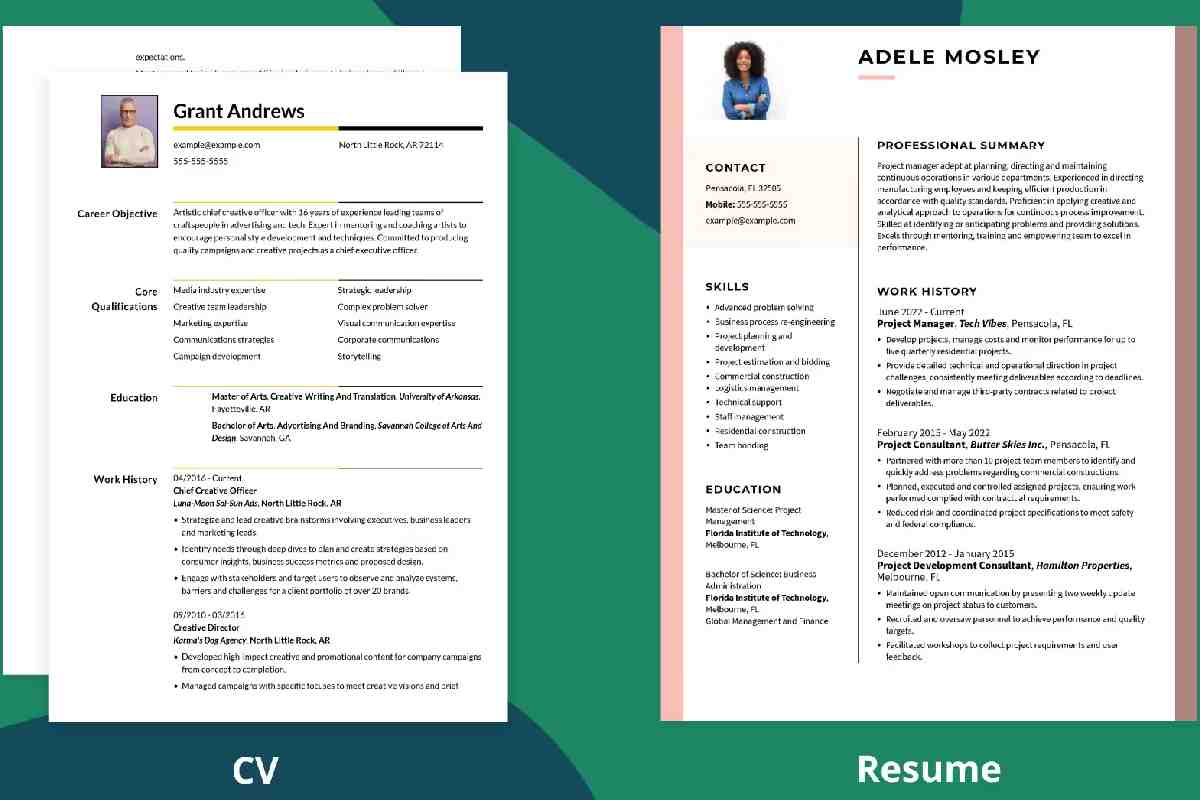

If you’re applying for jobs, scholarships, or academic positions, you’ve probably asked yourself what is a cv vs resume and which one you should submit. While many people use these terms interchangeably, they serve different purposes depending on the job, industry, and country.
Understanding what is a cv vs resume helps job seekers present their qualifications correctly and improve hiring chances. This guide explains definitions, differences, formats, usage, and when each document is appropriate.
Visual Overview: CV vs Resume at a Glance
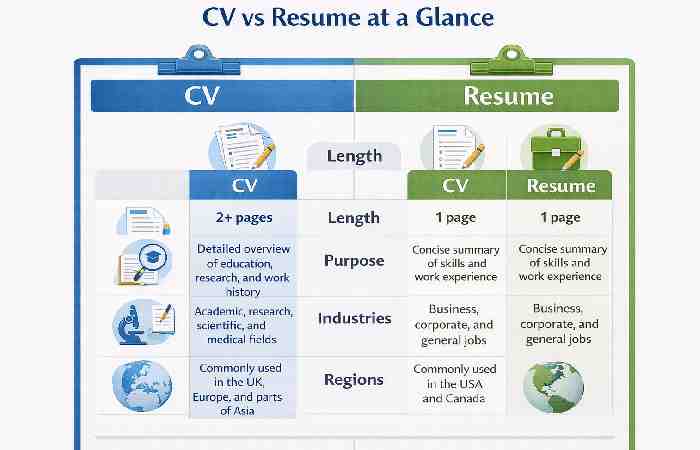
Tip: Use a simple comparison infographic with icons for education, experience, and skills.
What is a Resume?
A resume is a concise document summarizing your skills, work experience, and achievements tailored to a specific job.
Key Characteristics
- 1–2 pages long
- Customized for each job
- Focuses on skills & experience
- Used in corporate & private sectors
What is a CV?
A Curriculum Vitae (CV) is a detailed document presenting your complete academic, research, and professional history.
Key Characteristics
- Multiple pages (no limit)
- Includes publications & research
- Used in academic & research roles
- Static and comprehensive
What is a CV vs Resume?
| Document | Full Form | Purpose | Length | Focus |
| CV | Curriculum Vitae | Academic & research profile | 2–10+ pages | Complete career history |
| Resume | Summary of experience | Job applications | 1–2 pages | Relevant skills & experience |
Understanding what is a cv vs resume begins with knowing that a CV is comprehensive, while a resume is concise and tailored.
Key Differences Between CV and Resume
| Feature | CV | Resume |
| Length | Long & detailed | Short & concise |
| Customization | Rarely changed | Tailors for each job |
| Focus | Academic achievements | Professional skills |
| Usage | Education, research, medical | Corporate & private sector |
| Publications | Included | Rarely included |
| Certifications | Detailed | Summarized |
These distinctions clarify what is a cv vs resume and why using the correct document matters.
When to Use a CV vs Resume
| Situation | Use CV | Use Resume |
| Academic positions | ✔ | ✘ |
| Research roles | ✔ | ✘ |
| International applications | ✔ | ✔ |
| Corporate jobs | ✘ | ✔ |
| Internships | ✘ | ✔ |
| Medical careers | ✔ | ✘ |
Knowing what is a cv vs resume ensures you submit the right document for your field.
CV Structure: What to Include
| Section | Purpose |
| Contact Information | Professional identity |
| Academic Background | Degrees & institutions |
| Research Experience | Projects & findings |
| Publications | Journals & papers |
| Teaching Experience | Academic teaching roles |
| Conferences & Awards | Academic recognition |
| Skills & Certifications | Technical & professional |
A CV provides a full academic and professional history.
Resume Structure: What to Include
| Section | Purpose |
| Contact Details | Hiring contact info |
| Professional Summary | Quick value statement |
| Work Experience | Relevant job history |
| Skills | Core competencies |
| Education | Relevant degrees |
| Certifications | Job-related credentials |
A resume highlights only relevant qualifications.
Employer Preference: CV vs Resume Usage
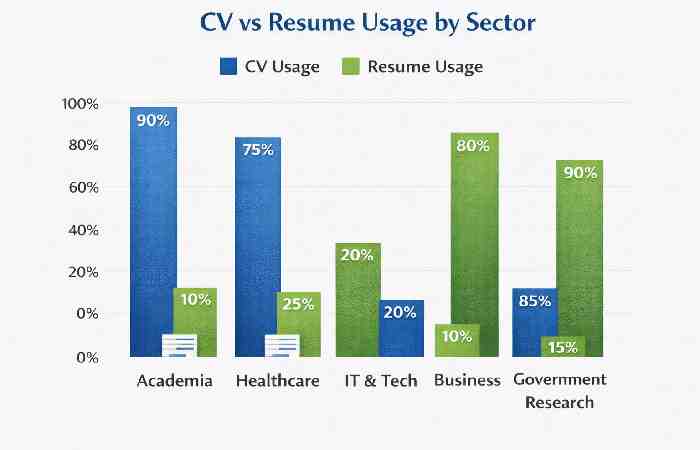
Regional Differences: CV vs Resume Usage
| Region | Preferred Document |
| United States | Resume |
| Canada | Resume |
| Europe | CV |
| UK | CV |
| Australia | Resume |
| India | Resume (CV for academia) |
Understanding global expectations is essential when learning what is a cv vs resume.
Advantages of Using a CV
- Shows complete academic history
- Ideal for research & higher education roles
- Demonstrates expertise & publications
- Useful for fellowships and grants
Advantages of Using a Resume
- Quick to read for recruiters
- Focuses on job-relevant skills
- Easier to customize
- Preferred by corporate employers
These benefits clarify what is a cv vs resume in practical job search situations.
What Suits You?
Choose a CV if:
- You are applying for academic or research positions
- You have publications or research experience
- You are seeking fellowships or PhD programs
Choose a Resume if:
- You are applying for corporate or private sector jobs
- You need a concise skill-focused document
- You want to tailor applications for each role
Choosing correctly demonstrates your understanding of what is a cv vs resume.
Common Mistakes to Avoid
- Submitting a CV for corporate roles
- Sending a generic resume to multiple employers
- Including irrelevant personal details
- Making documents too long or too brief
- Not updating achievements
Avoiding these mistakes improves hiring success.
Expert Tips to Make Your CV or Resume Stand Out
- Use action verbs and measurable achievements
- Keep formatting clean and professional
- Include keywords from the job description
- Use bullet points for readability
- Proofread for grammar and spelling
High-Authority Resources
Harvard Career Services: https://careerservices.harvard.edu
Indeed Career Guide: https://www.indeed.com/career-advice
These sources provide official guidance on professional document standards.
Step-by-Step Guide: How to Create a CV and Resume Using Technology
Modern tools make it easy to build professional, ATS-friendly documents. Below is a clear workflow showing how to create both a CV and a resume using digital tools and smart automation.
Step-by-Step: Creating a CV Using Technology
Step 1: Choose a CV Builder Platform
Use trusted platforms designed for academic and professional profiles:
- Canva
- Zety
- Overleaf (best for academic CVs)
- Microsoft Word templates
Overleaf is widely used in academic and research communities.
Step 2: Select an Academic CV Template
Choose templates designed for:
- Research & publications
- Teaching experience
- Conferences & grants
Tip: Search “academic CV template LaTeX” in Overleaf.
Step 3: Gather Required Information
Prepare digital files:
- Degrees & transcripts
- Research papers & publications
- Conferences & presentations
- Awards & grants
- Certifications
Use cloud storage like Google Drive to organize files.
Step 4: Use AI Tools to Draft Content
AI tools can improve clarity and structure:
- Grammarly — grammar & tone
- ChatGPT — bullet point refinement
- QuillBot — rewrite long descriptions
Keep language formal and academic.
Step 5: Insert Publications Automatically
Use reference managers:
- Zotero
- Mendeley
These tools export citations directly into CV formats.
Step 6: Export and Save in Multiple Formats
Save as:
- PDF (preferred)
- DOCX (editable version)
- Cloud backup
Step-by-Step: Creating a Resume Using Technology
Step 1: Use an ATS-Friendly Resume Builder
Recruiters use Applicant Tracking Systems (ATS). Use tools that optimize formatting:
- Resume.io
- Novoresume
- LinkedIn Resume Builder
- Canva
Step 2: Select a Clean, ATS-Compatible Template
Avoid:
- Graphics-heavy layouts
- Tables with complex formatting
- Unusual fonts
Choose:
- Slayout
- Clear headings
- Standard fonts (Arial, Calibri)
Step 3: Use Job Description Keyword Tools
Optimize for ATS ranking:
- Jobscan — keyword matching
- LinkedIn job postings for keyword ideas
- Match skills with job descriptions.
Step 4: Generate Achievement-Based Bullet Points
Use this formula:
Action Verb + Task + Result + Numbers
Example:
- Increased website traffic by 45% using SEO optimization
- Reduced costs by 20% through process improvements
AI tools can help quantify achievements.
Step 5: Optimize for ATS & Readability
Use tools:
- Grammarly
- Hemingway Editor — readability check
Step 6: Export & Test ATS Compatibility
Save resume as:
- DOCX
Test ATS readability using Jobscan.
Tech Tools Comparison Table
| Feature | CV Tools | Resume Tools |
| Best Platform | Overleaf | Resume.io |
| AI Assistance | ChatGPT | Jobscan |
| Grammar Check | Grammarly | Grammarly |
| Citation Support | Zotero | Not needed |
| ATS Optimization | Not required | Essential |
Automation Tips to Save Time
- Sync documents with cloud storage
- Maintain a master CV and tailor resumes
- Use AI for rewriting and keyword optimization
- Save multiple versions for different roles
Common Tech Mistakes to Avoid
- Using overly designed templates
- Ignoring ATS formatting rules
- Copy-pasting job descriptions
- Not proofreading AI-generated text
- Saving files with unprofessional names
Tip
While technology can ease the process, the quality of the content is still important. For example, a good CV shows the best of your educational history, and a good resume that is optimized with keywords increases the chances of getting the interview.
Final Thoughts
For students, professionals, and job seekers, knowing what is a cv vs resume is important. A CV is a detailed academic history, and a resume is a shorter document that is focused on a particular job.
Knowing the use and purpose of these documents helps with the success of job applications and the improvement of your professional image. CV vs resume, when done correctly, gives the best possible confidence that your qualifications are well articulated.
