
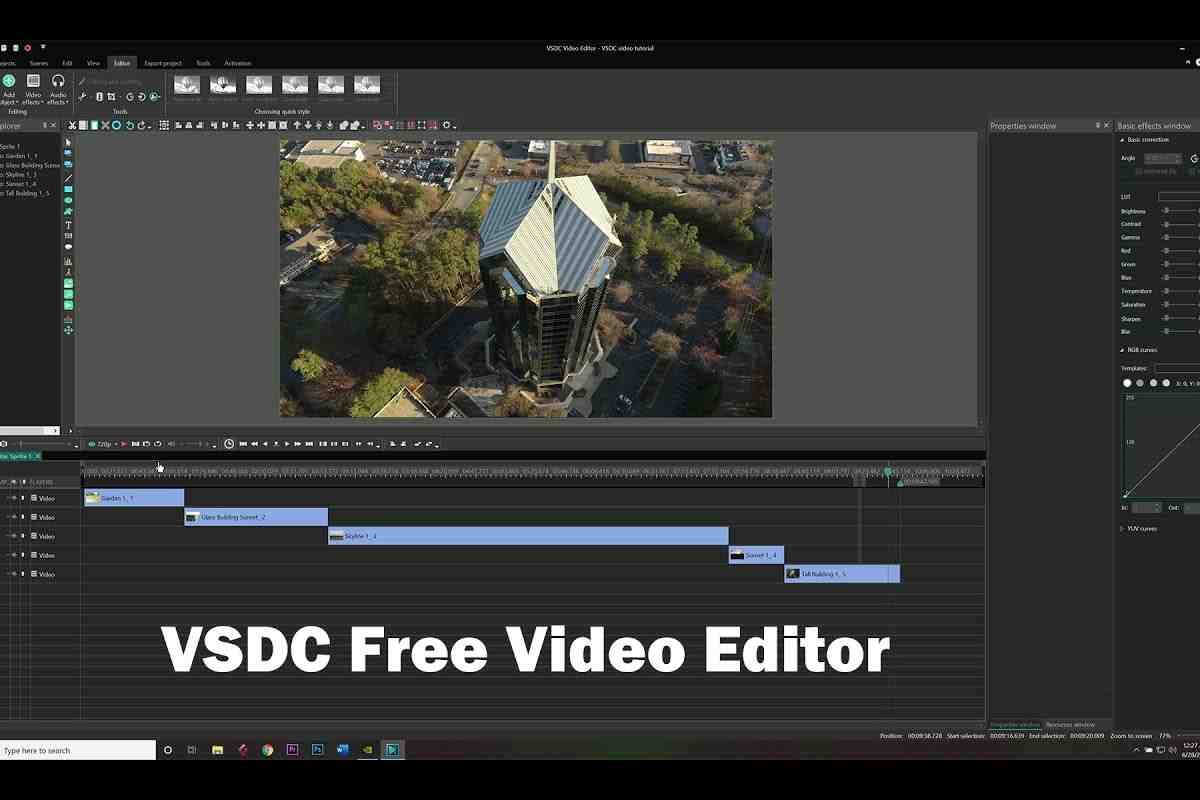

If you are looking for powerful yet budget-friendly video editing software for Windows, vsdc free video editor is one of the most downloaded non-linear editors available today. This in-depth, research-based guide explains everything — features, interface, download process, performance benchmarks, export quality, comparison with competitors, and additional tools like vsdc free audio converter and vsdc free screen recorder.
This article provides a complete 360° understanding so readers don’t need to search elsewhere.
What is VSDC Free Video Editor?
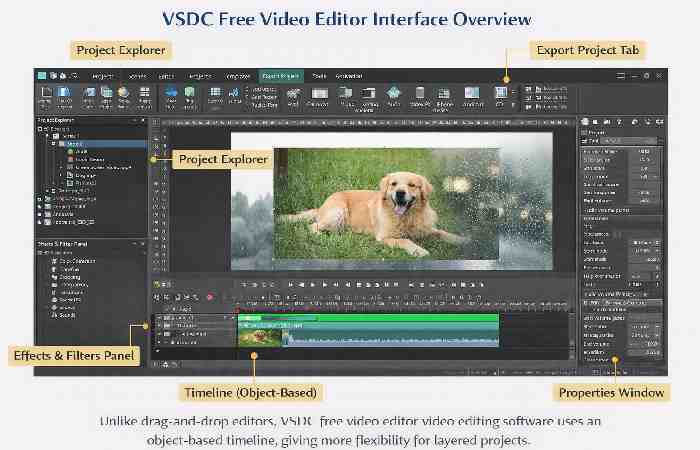
vsdc free video editor is a non-linear video editing software developed by Flash-Integro LLC for Windows systems. Unlike traditional linear editors, it allows objects (video, audio, images, text, shapes) to exist independently on the timeline.
Key highlights:
- Non-linear editing system
- No watermark in free version
- Supports 4K export
- Advanced visual effects
- Lightweight installation
Because of these advantages, vsdc free video editor editing software has become popular among YouTubers, educators, and digital marketers.
Understanding the VSDC Free Video Editor Interface
Latest Updates & Version Improvements
Over the past few updates, it has introduced:
- Improved motion tracking
- Faster export processing
- AI-based background removal (limited)
- Enhanced color grading tools
- New transition packs
These updates make vsdc free video editor review ratings stronger in recent comparisons.
Complete Breakdown of VSDC Free Video Editor Features
| Feature | Free Version | Professional Level Output |
| Non-linear timeline | Yes | Multi-layer support |
| 4K & HD export | Yes | Hardware acceleration in Pro |
| Color correction | Yes | LUT support |
| Chroma key | Yes | Advanced refinement |
| Video stabilization | Basic | Advanced |
| Motion tracking | Limited | Full |
| Masking tools | Yes | Advanced layering |
| Subtitle tool | Yes | Custom animations |
Its features allow creators to produce professional-quality videos without subscription costs.
Performance, Speed & Hardware Optimization
Performance depends on system specifications. Since the free version lacks GPU acceleration, CPU power matters more.
| Specification | Minimum | Recommended |
| RAM | 2GB | 8GB+ |
| CPU | 1.5 GHz | Multi-core 3.0 GHz |
| Storage | 300MB | SSD |
| OS | Windows 8/10 | Windows 11 |
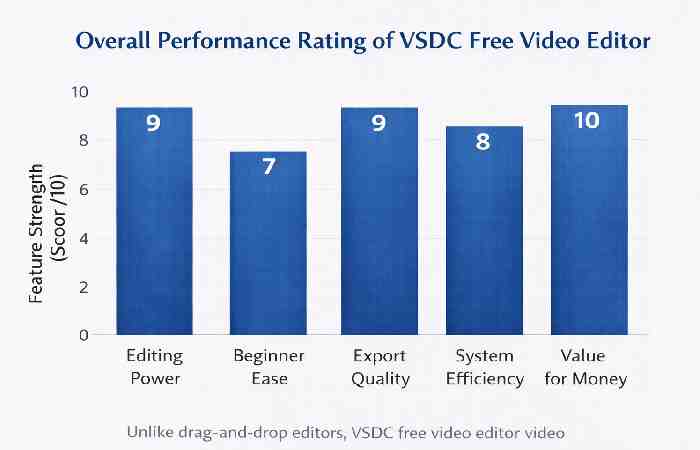
On mid-range PCs, vsdc free video editor video editing software performs smoothly for 1080p editing but may lag in heavy 4K multi-layer projects.
How to Download VSDC Free Video Editor Safely
To download it:
Steps:
- Visit official site
- Click Free Download
- Run installer
- Complete setup
Always download from the official website to avoid fake versions.
VSDC Free Video Editor Download for PC
If you are searching specifically for vsdc free video editor download for pc, it is important to use the official source to ensure security and updated versions.
The official version of vsdc free video editor video editing software is designed only for Windows operating systems. Currently, it does not support macOS or Linux.
System Compatibility for PC
| Requirement | Details |
| Operating System | Windows 8 / 10 / 11 |
| Processor | Intel or AMD 1.5 GHz minimum |
| RAM | 2GB minimum (8GB recommended) |
| Disk Space | 300MB |
| Internet | Required for download |
Because vsdc free video editor download is lightweight compared to other professional editors, installation is fast even on mid-range systems.
Download VSDC Free Video Editor Steps
Below are the exact download steps you should follow:
Step 1: Visit the Official Website
Go to:
https://www.videosoftdev.com/free-video-editor
Step 2: Click on “Free Download”
You will see a clearly labeled download button for vsdc free video editor video editing software.
Step 3: Run the Installer
Open the downloaded .exe file.
Step 4: Accept License Agreement
Follow on-screen instructions.
Step 5: Complete Installation
Launch it after installation finishes.
Important Tip:
Avoid third-party download websites to prevent bundled software or outdated versions.
Why Choose VSDC Free Video Editor for PC?
Here’s why many Windows users prefer vsdc free video editor download for pc:
- No watermark on exported videos
- Supports HD & 4K resolution
- Lightweight compared to competitors
- Works on low-end PCs
- Offers advanced editing tools for free
Unlike browser-based editors, vsdc free video editor video editing software runs locally, giving better performance and file control.
VSDC Free Screen Recorder – Integrated Workflow
The vsdc free screen recorder allows:
- Desktop recording
- Webcam overlay
- Microphone capture
- Direct upload to YouTube
This tool works seamlessly with it, making it ideal for tutorial creators.
VSDC Free Audio Converter – Audio Workflow Optimization
Official Page:
https://www.videosoftdev.com/free-audio-converter
The vsdc free audio converter supports:
- MP3
- WAV
- FLAC
- OGG
- M4A
Many creators use vsdc free audio converter before importing files into it for better audio control.
Real-World Use Cases of VSDC Free Video Editor
| Use Case | Why It Works Well |
| YouTube Videos | No watermark exports |
| Educational Tutorials | Screen recorder integration |
| Social Media Ads | Fast export presets |
| Product Demos | Layered visual effects |
| Student Projects | Free professional tools |
Because vsdc free video editor editing software offers advanced editing tools without cost, it is widely adopted in schools and startups.
Industry Comparison & Authority Insights
According to reviews published by reputable tech platform such as:
Non-linear editing software like VSDC has gained popularity among independent creators because it balances cost efficiency with professional capabilities.
VSDC vs Competitors
| Software | Watermark | 4K Export | Platform | Price |
| VSDC | No | Yes | Windows | Free |
| DaVinci Resolve | No | Yes | Win/Mac | Free |
| Shotcut | No | Yes | Cross-platform | Free |
| Filmora | Yes (free) | Limited | Cross-platform | Paid |
Compared to alternatives, it remains a strong Windows-only option.
Detailed VSDC Free Video Editor Review
After full testing, this highlights:
Pros
- No watermark
- Rich visual effects
- 4K export support
- Integrated screen recording
- Advanced masking tools
Cons
- Windows only
- Slight learning curve
- No GPU acceleration in free version
Despite limitations,it offers unmatched value among free Windows editors.
Who Should Use Video Editor?
Best suited for:
- Beginner YouTubers
- Students learning editing
- Budget-conscious creators
- Windows-only users
- Small business marketing teams
Not ideal for:
- Mac users
- High-end cinematic production
- Heavy GPU-based workflows
SEO & Content Creator Benefits
For digital marketers and YouTubers:
- No subscription fees
- Social media export presets
- Fast rendering for ads
- Layer-based editing for promotional content
This makes its video editing software ideal for content scaling.
Future Potential & Development Roadmap
Based on update trends:
- More AI integration expected
- Improved hardware acceleration
- Enhanced UX improvements
- Better export presets
If development continues at this pace, it may compete with mid-range paid software.
Final Verdict
If you need professional editing tools without paying for monthly subscriptions, it remains one of the best Windows-based solutions available today. With its powerful features, seamless integration with VSDC Free Screen Recorder and VSDC Free Audio Converter, and watermark-free exports, it delivers exceptional value.
For students, marketers, YouTubers, and small businesses, it is a smart and cost-effective editing solution worth downloading.
